
Project overview
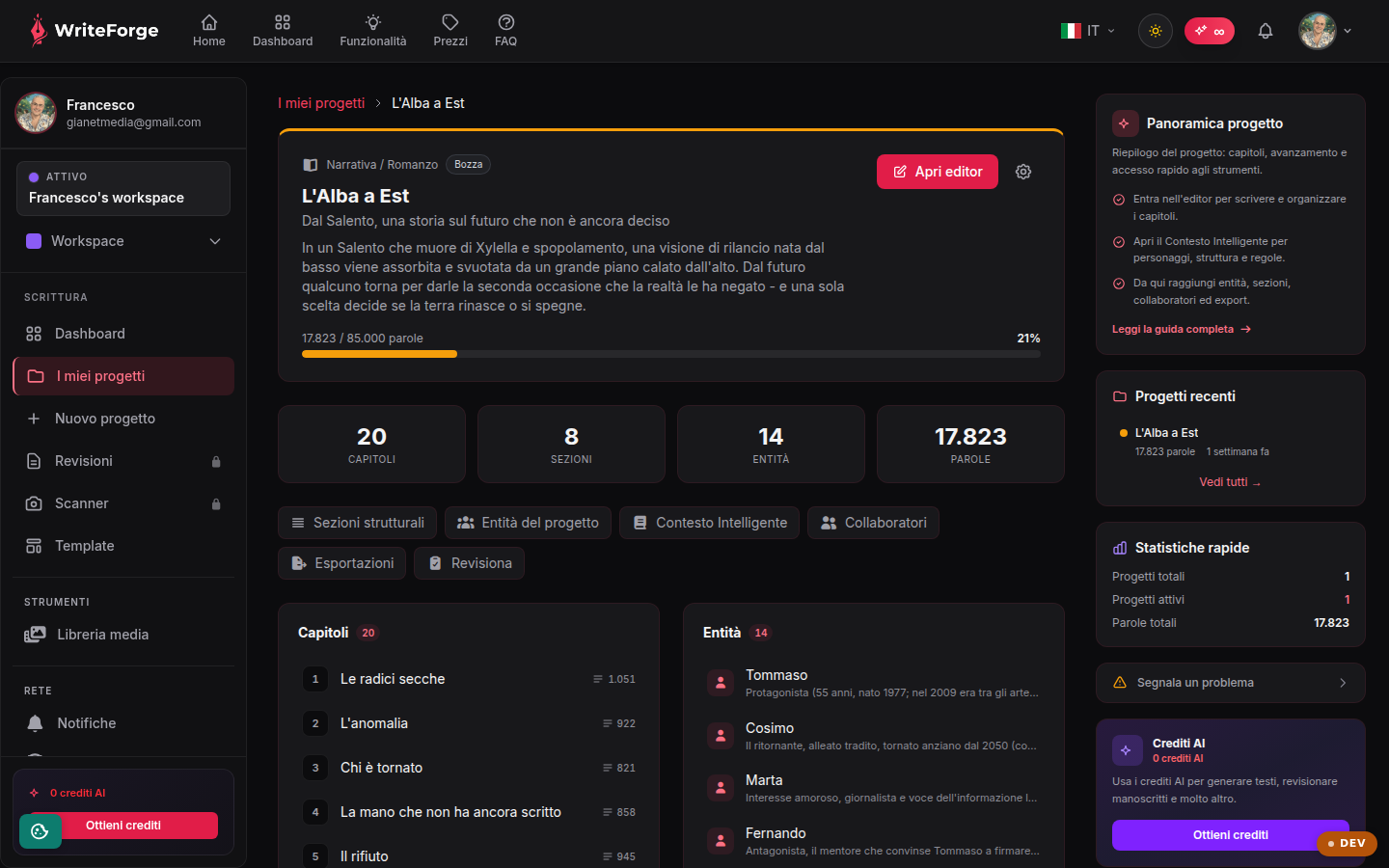
A summary of the project: chapters, progress and quick access to the tools.
Key points
- Jump into the editor to write and organize chapters.
- Open Smart Context for characters, structure and rules.
- From here you can reach entities, sections, collaborators and exports.
The project's headquarters
The overview gathers chapters, progress and all the tool tabs. The visible tabs depend on the project category: Sections, Smart Context, Exports and Collaborators are always there; Entities and Worldbuilding appear for fiction, Citations for academic and research work.
Recommended workflow
Before writing, it pays to prepare the ground: define the structure in Sections, populate the main Entities and check Smart Context. Then jump into the editor: the AI will use all that context to stay consistent with your world.
Advanced tools
From the overview you can also start a manuscript Review (multi-level text analysis) and the Exports in professional formats. Some features depend on your active plan: those not included show a lock icon.
Publishing to Content Scheduler
If the project is in the Content category (blog, newsletter, copy, press releases, web content), the overview shows a "Send to Content Scheduler" button: it creates an article in Content Scheduler from your chapters, with no copy-paste. From there you review and schedule publishing to WordPress and social. Re-sending updates the same article while it is a draft; after publishing, a new send creates a new draft. The "Open in Content Scheduler" link takes you straight to the article.