
Your dashboard
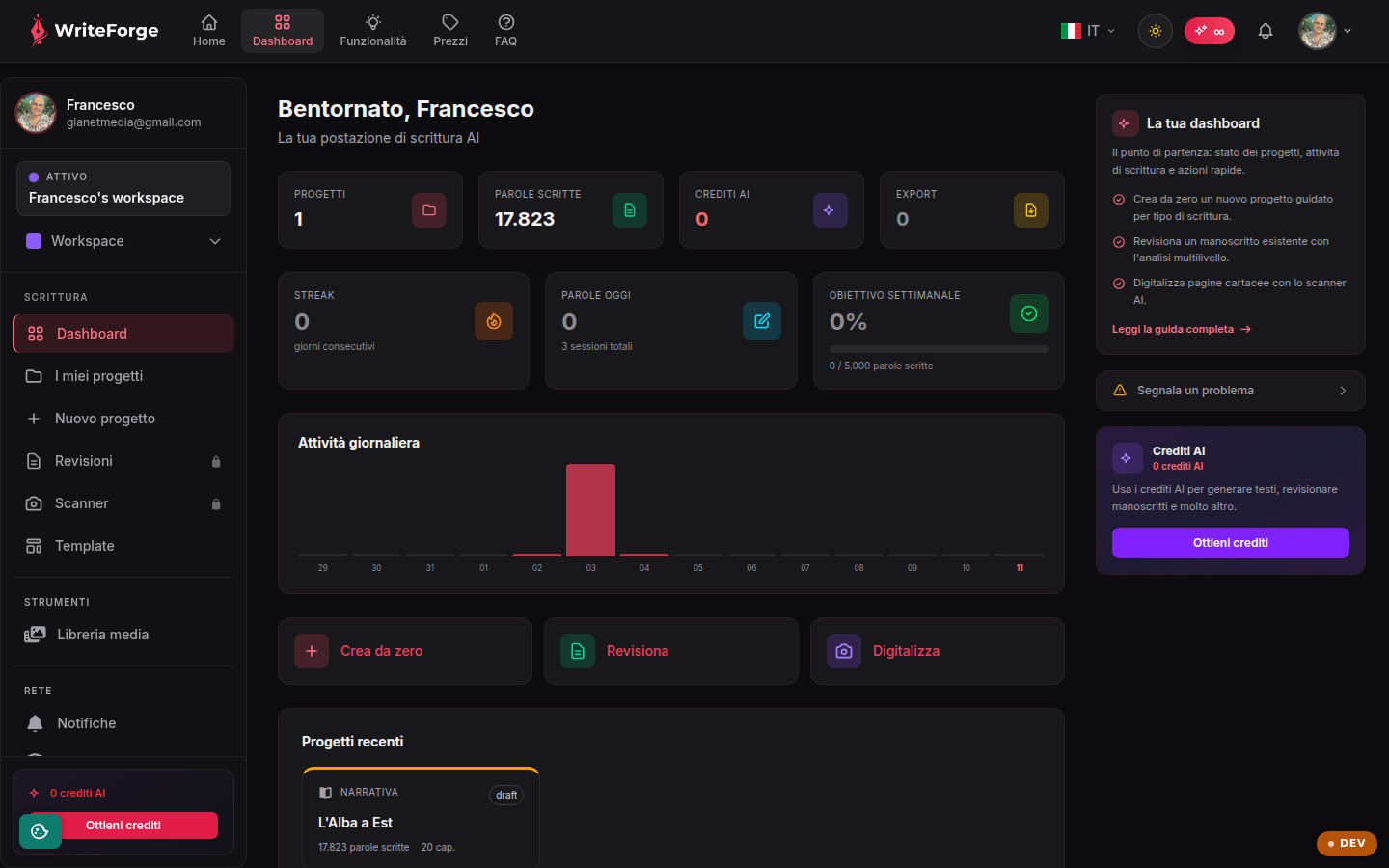
Your starting point: project status, writing activity and quick actions.
Βασικά σημεία
- Start a new guided project from scratch by writing type.
- Review an existing manuscript with multi-level analysis.
- Digitize paper pages with the AI scanner.
What the dashboard is for
The dashboard is your home screen: it gathers all your writing projects with their status, word count and last edit, so you can pick up where you left off in one click. From here you also reach the quick actions and WriteForge's three main ways of working.
The three starting points
WriteForge gives you three ways to begin. "Create from scratch" starts a guided flow that adapts phases and structure to the chosen writing type (novel, essay, academic paper, manual and 40+ types). "Review manuscript" uploads an existing text (DOCX/PDF/TXT) and analyses it across multiple levels, structure, consistency, style, pacing. "Digitize manuscript" turns paper pages into text via the AI scanner, ready for review.
Status and resuming work
Each project shows its progress and word count at a glance. Open a project for the full overview, or jump straight into the editor to write. Recent projects stay at the top so you can find them instantly.
How to set it up
The dashboard needs no configuration: it fills up automatically as you create projects. To customise language, light/dark theme and time zone use the Profile page. The time zone you set there is used to display dates and last-edit times correctly.